


 May 11, 2026
 OL Code on Whirlpool Cabrio Washer: How to Fix It
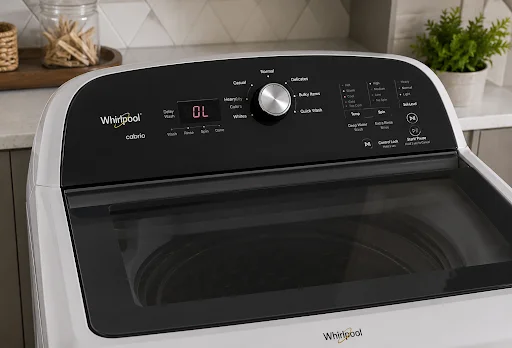
If you’ve ever loaded up your washer and walked back to find it frozen mid-cycle with an “OL” flashing on the display, you know how frustrating it can be. The OL error code on a Whirlpool Cabrio washer stands for Overload. The machine is telling you it’s been asked to do more than it safely can. The good news? This error is usually something you can troubleshoot yourself. The better news? It’s also very preventable once you understand what’s causing it.
What Does the OL Error Code Mean?
When the machine detects that the drum is carrying too much weight or that the motor is being strained beyond its design limits. It shuts down to prevent damage to the motor, drum bearings, or suspension system. Think of it as the washer’s self-preservation instinct.
This error can appear on Whirlpool Cabrio top-loaders and related models from Maytag Bravos and Kenmore Oasis lines, which share the same platform. So if you’re seeing the OL code on a Cabrio washer, the following steps apply directly to your machine.
Common Causes of the OL Error
Before diving into fixes, it helps to know why the error is happening. The most frequent culprits are:
- Overloaded drum – Simply putting too many clothes in a single load is the number one cause.
- Unbalanced load – Heavy items like jeans, towels, or blankets can clump on one side, creating excessive strain even if the total weight isn’t extreme.
- Washing a single heavy item – A large comforter or a pair of heavy boots alone can trigger the error.
- Worn suspension rods or springs – If the drum’s support system is degraded, even a moderate load can feel like an overload to the sensors.
- Faulty load sensor or control board – Less common, but a malfunctioning sensor can misread normal loads as excessive.
How to Fix OL Mode on a Cabrio Washing Machine
Here’s a step-by-step approach to clearing the error and getting your laundry done.
Step 1: Stop the Cycle and Open the Lid
Press Pause/Cancel to halt the current cycle. Wait about 60 seconds, then open the lid. This gives the machine time to reset its internal error state.
Step 2: Remove Some of the Load
Take out roughly 20–30% of the items in the drum. Redistribute what remains, making sure items are spread evenly around the agitator post or impeller. Avoid having one side heavily weighted.
Step 3: Restart the Cycle
Close the lid and select your wash cycle again. If the OL code on the Cabrio washer doesn’t return, you’re good, the issue was simply too much weight or an imbalance.
Step 4: Run a Rinse & Spin Only
If the drum is already soaking wet and you can’t easily remove items, try running just a Rinse & Spin cycle. This lighter cycle may complete successfully, and once the clothes are wrung out (and lighter), you can re-wash the removed items in a separate load.
Step 5: Check the Suspension System
If the OL error returns with loads that seem perfectly reasonable, the issue may lie with the internal suspension system, specifically the suspension rods that support the drum assembly. When these rods wear down, the drum sits unevenly and can signal an overload even when the load is normal. However, if you’re not comfortable disassembling your washer, this is a good point to call in professional help. Our washer repair services cover exactly this kind of internal component diagnosis.
Step 6: Check for Error Persistence After Reset
If none of the above resolves the issue, the problem may lie with the motor control board or the load sensor. These components require a multimeter and some technical know-how to test properly.
How to Prevent the OL Error from Coming Back
Fixing the error once is satisfying. Never seeing it again is better. Here’s how to avoid the OL code on your Whirlpool Cabrio washer in the future:
- Follow the load capacity guidelines. Your Cabrio has a maximum load capacity, typically 3.5 to 5.3 cubic feet depending on the model. A good rule of thumb: the drum should be no more than ¾ full. Don’t pack it tightly; clothes need room to move for effective cleaning anyway.
- Separate heavy items. Wash heavy items like jeans, towels, and blankets in smaller batches, or pair a single heavy item with several lighter ones to balance the load.
- Never wash a single large item alone. A king-size comforter or a heavy winter coat creates severe imbalance in top-loaders. Either add a few towels to balance the load, or take it to a laundromat with a front-loading commercial machine.
- Use the right spin speed for the load type. Heavy items on high spin can make imbalance worse. Use a lower spin speed setting for bulky loads.
- Perform routine maintenance. Every 6–12 months, check your suspension rods for wear, clean the drum interior, and run a cleaning cycle to remove detergent buildup. Buildup can add unnecessary weight and friction over time.
- Don’t ignore early warning signs. If your washer is shaking more than usual, making grinding noises, or taking longer to finish cycles, these are signals that something mechanical is off. Catching it early prevents bigger repairs down the road.
When to Call a Professional
Most OL errors are user-fixable. If your Whirlpool Cabrio washer keeps showing the OL code, Smart Appliance Services can diagnose the issue and provide reliable washer repair in Saint Pete and the surrounding Tampa Bay area.
Attempting to repair circuit boards or motors without the right tools and training can turn a minor fix into a major replacement. Our repair services are available for Whirlpool, Maytag, Kenmore, and all major brands. If you’re located in the Tampa Bay region, our team offering appliance repair in Saint Pete can have a technician out quickly to diagnose and fix the root cause properly.
FAQ
What does OL mean on a Whirlpool Cabrio washer?
OL stands for Overload. The washer’s sensors have detected that the drum load exceeds safe operating limits, so the machine pauses the cycle to protect its motor and components from damage.
Can I fix the OL code on a Cabrio washer myself?
In most cases, yes. Start by removing some items from the drum, redistributing the load evenly, and restarting the cycle. If the error persists with normal-sized loads, the suspension rods may need replacement, a DIY-friendly repair for those comfortable with basic appliance work.
How do I fix OL mode on a Cabrio washing machine if the load isn’t too heavy?
If your load size seems reasonable but the error keeps appearing, the suspension rods are the most likely culprit. These rods support the drum and wear down over time. You can also check whether the error code clears after running a diagnostic cycle (hold the Start button for 3 seconds on most models to initiate).
Will the OL error damage my washing machine?
The OL error is a protective feature — the machine is stopping before damage occurs. As long as you don’t repeatedly force the machine to run overloaded, the error itself won’t cause damage. Ignoring it and finding workarounds to override it is what causes real harm.
How often should I service my Whirlpool Cabrio washer to avoid errors like OL?
A general maintenance check every 12 months is a good practice. This includes inspecting the suspension system, cleaning the drum, and checking for worn belts or bearings. If you notice unusual vibration, noise, or recurring errors between annual checks, schedule a service call sooner rather than later.